Overview
The event page opened with a jab: you've used Claude to rewrite an email, so today we make it run your SEO. On 17 October, Harkirat Singh spent three hours at The GTM School showing a room in Bengaluru how he uses Claude for real go-to-market work: SEO, comparison pages, LinkedIn outreach and Reddit research, much of it on a schedule. He leads product and GTM at Noveum.ai, which does evals and tracing for AI agents and voice bots, and he founded AI Learn Circle, a community of more than 4,000 builders across India.
This was a workshop, so we built as we went. Below are my notes, the parts I filled in afterwards (some tool names in my notes were half written), and what I built for my own test company during the session. Any mistakes are mine.
Speaker: Harkirat Singh, product and GTM at Noveum.ai, founder of AI Learn Circle
Event: Getting Started with Claude as Your GTM Co-Pilot (event page)
Series: The GTM School, a community initiative by AI Learn Circle and Women in Product Marketing, with Paytm as community partner
Date and venue: 17 October 2026, Paytm's office, Bengaluru
Run it once by hand, fix it, then schedule it. Never schedule something you haven't watched work.
A session where nothing was held back
This was an amazing session, and extremely valuable. Nothing was held back. Harkirat showed his real context files, the skills he runs every week, the scouts that post into his Slack each morning, and the DMs he used to send before he fixed them. Then he handed the skills and prompts to the room so we could run them the same afternoon. I rarely see someone open up their own working setup like that.
His GTM expertise showed in every module, and so did the way he teaches. He explained each idea in plain words, showed it running on his own work, and then had us build it ourselves before moving on. He was clearly happy to share everything he knows.
A big thank you to AI Learn Circle for putting on a session this good for free.
What I took away
Context decides the output. The same ask with and without your company files gives you two completely different results. Write company.md and icp.md before you write a single prompt.
Turn repeat work into skills and chain them. One keyword goes in, a researched and checked blog comes out, and you approve it before anything ships.
Put Claude in the middle of your tools. Feed it Search Console, Analytics and Semrush data, and have the results land in Slack or a sheet.
Watch it work before you automate it. Every scout runs once by hand, gets fixed, and only then goes on a schedule.
Reddit is a community, not a marketplace. Learn how each subreddit works before you post, or you get banned.
How the 90 minutes ran
The agenda slide said "more doing than listening", and it was. Each module had a task:
| Minutes | Module | What we did |
|---|---|---|
| 0 to 8 | Why now | Listened |
| 8 to 20 | 01 Context | Wrote company.md and icp.md |
| 20 to 32 | 02 Skills | Turned one task into a skill |
| 32 to 42 | 03 Connectors | Asked our real data a question |
| 42 to 58 | 04 Claude Code and the app | Ran one scout end to end |
| 58 to 80 | Build sprint | Shipped one workflow |
| 80 to 90 | Rules and a 7 day plan | Picked our next step |
01 Context: build a GTM brain
Two files every GTM person should already have
Everything starts with two markdown files. Every skill and every scout reads them before doing anything.
company.md says what you do, the proof you can claim (only numbers you can back up, such as your own benchmark), who your competitors are, and your voice (for example: short lines, no hype).
icp.md describes your ideal customer: two or three segments, the trigger event that makes them buy, who signs the deal, and who is not a fit. Harkirat's real example of a trigger was a team saying a prompt fix broke their agent in production. His "not a fit" list named students, recruiters and other eval vendors, so his scouts skip them.
Then grow it into a folder
Over time the two files become a GTM brain folder:
company.md: what you do, proof, voiceicp.md: segments, triggers, who to skipvoice.md: banned words, like "leverage", "robust" and "seamless"competitors.md: who the scouts should filter outproof.md: real results you are allowed to quoteskills/: your recipes
In the Claude app this lives in a Project, with the files uploaded and the rules in the project instructions. In Claude Code it is just a folder, with a CLAUDE.md that points to every file.
Same ask, with and without context
This slide made the case better than anything else. On one side was one of his early LinkedIn DMs, written without context: a generic "came across your work, we're both in the AI space, would love to connect". He called it out himself as cheesy and bot-like, something you could send to anyone.
On the other side was a DM his LinkedIn scout wrote that morning with the context files loaded. It opened with a point from the person's own post, added Noveum's view on it, said in one line what Noveum does, and asked to connect. The pattern: a hook from their post, then your own take, then one line about you, all under 300 characters.
The activity: let Claude interview you
To write the two files, he had us create a new Claude Project called "gtm brain" and paste a prompt that makes Claude interview you, one question at a time. It asks what you sell and the outcome you deliver, who your three best customers are, what changed right before they bought, who started the deal and who signed it, and who turned out to be a bad fit. Then it writes both files using only your answers, and marks anything you didn't cover as [todo] instead of making it up.
The test: ask for a LinkedIn post inside the project and outside it, and compare. You're done when it writes like you without you explaining.
What makes a good prompt
Harkirat's list was short:
- Context: your files, your examples, what you already know.
- Role: he said it makes much less difference these days.
- Constraints and negative prompts: what it must not do.
- Instructions: research first, and be specific. Name the profiles, IDs and newsletters you want it to use.
Afterwards I checked this against Anthropic's own prompting guide and filled in a few things:
- Write it so a new colleague with no context could follow it. The guide's test: if that colleague would be confused, Claude will be too.
- Say why a rule exists. "Keep DMs under 300 characters because longer ones get cut off in the preview" works better than the bare rule.
- Show three to five examples. For GTM that means pasting your best past posts or DMs.
- Put long material (files, research) first and the question last.
- Say what to do, as well as what not to do. "Write short, plain sentences" steers better than "don't be wordy". Keep the hard rules, like banned words and no invented numbers, as a list.
- Ask it to tell you what's missing before it starts, and to mark unknowns instead of guessing. Harkirat's own prompts all did this.
02 Skills: one keyword in, a blog out
A skill is a saved recipe that Claude runs the same way every time. Harkirat's SEO setup chains eight steps:
- Research: what do buyers actually ask?
- Keywords: find terms with 500 to 10,000 searches a month and a keyword difficulty under 30.
- Brief: outline, title, meta description and writing rules.
- Write: the full post, with verified pricing and no made-up numbers.
- Image: a 1200 × 630 header.
- Comparison page: a "you vs them" page for buyers who are ready to pick.
- Check: will AI tools like ChatGPT and Perplexity cite it?
- Approve: a person says yes in Slack. Nothing ships without it.
I won't share the skills themselves, but the idea is simple to copy: one skill per step, each with its own rules, each reading the GTM brain first.
SEO notes from the session
- Target every stage of the funnel. Top of funnel posts answer "what is" and "how to" questions. Middle of funnel posts compare options. Bottom of funnel pages (pricing, alternatives, comparisons) catch people ready to buy.
- Pick keywords with more volume and less difficulty. KD is Semrush's 0 to 100 score for how hard it is to reach the top ten results.
- Write each blog around one primary keyword, then find the secondary keywords and work them in.
- Look at the search results page before writing to see which pages and keywords already rank.
- Keep an SEO instruction file with your writing rules, so every post follows them. Harkirat shared his: short intros that name the reader's problem, short paragraphs, something visual every few hundred words, a list of banned AI-sounding phrases, and no numbers without a source.
- Use a CMS such as Strapi or Ghost to publish.
- Host the blog on your own website, so the traffic builds up on your own domain.
- Semrush now works inside Claude as a connector, so Claude can look up which keywords are worth writing about.
- For SEO, watch click-through rate. For AEO (getting cited in AI answers), watch Semrush's AI visibility signals.
- Claude doesn't draw images itself, so his image skill makes the blog header for him.
03 Connectors: Claude in the middle of your stack
The connectors slide put Claude, with company.md and icp.md loaded, in the middle of a diagram.
Data coming in:
- Google Search Console: queries where you rank between position 5 and 20, the pages closest to page one
- Google Analytics: pages that break or lose traffic
- Semrush: search volume, difficulty and cost per click
- Apify: Reddit and LinkedIn posts
Work going out:
- Slack: every digest lands here
- Sheets and Drive: the team's copy
- Chrome: checks links while logged in
- Exa: web research with sources
Where there is no ready connector, Google Apps Script fills the gap. Ask Claude to write a script that pulls from Search Console or Semrush, schedule the prompt, and have it post the result to Slack.
For LinkedIn data you can use Exa, whose search has a people category for finding profiles, or Apify. Claude's in-app browser works too.
04 Where to build, and the one habit
Harkirat builds in three places:
- The Claude app: hand it a task and get a doc, sheet or deck back. Cowork lives here now. He uses it for briefs, hunting broken links, and he made this deck there.
- Claude Code: works inside your GTM brain folder and writes scripts when the job is 500 rows, not 5. He uses it for keyword sheets and skill files.
- Scheduled tasks: the same job every morning without anyone asking. His Reddit scout runs at 8:57 and his LinkedIn scout at 9:15.
The habit that ties them together: run it once by hand, fix it, then schedule it.
The one prompt to build anything
His last slide was a fill-in-the-blanks prompt for building any GTM workflow. You state the goal (what lands where, like 10 leads in Slack every morning), the data source, the skill to use if there is one, and where the output goes. Then the prompt tells Claude to read your two context files, list the connectors and skills it needs and say which are missing, show a five step plan and wait for your OK, run it once on real data, fix what you correct, and only then save it as a skill and schedule it. It also says drafts only: never post or send anything without asking.
Why it works: it checks what's missing before it starts, you approve the plan, there is one real run before any schedule, and your fixes become the skill.
Outreach: LinkedIn and Reddit
A simple LinkedIn scout
Start with a scout that finds anyone writing about the problem you solve. Write it with the good prompt structure above, and have it check whether each person's company is funded and what they have been commenting on.
Going slow on DMs
For automated LinkedIn DMs he uses an API tool (I wrote it down as "Unity"; my best guess is Unipile, which sends LinkedIn messages from your own account). His rules: about 10 DMs a day, go slow, and use LinkedIn Premium to lower the risk of a ban.
Learn first, or you get banned. Reddit tells you where to post and what to post if you spend time reading it. It is a community, not a marketplace.
Tools and recommendations
- Canva for design. He called it the best design tool, said almost all YouTube thumbnails are made in it, and pointed out it is cheap in India, with some telecom plans bundling it.
- Growth Unhinged, Kyle Poyar's growth newsletter. He said it is worth paying for.
- DeepLearning.AI for courses.
What I built during the session
I used a placeholder company for an AI and automation services idea I'm exploring, so I could practise on something real without posting under its name.
First, the GTM brain: a CLAUDE.md with brand voice and rules, a company.md, and an icp.md where every market number has a source and is labelled verified, from search, or assumed. That labelling paid off right away, because the blog skills could only cite the verified ones.
Then a LinkedIn scout, run in Claude's built-in browser while I was logged in: about 14 searches and more than 100 posts read. The biggest lesson: searching for pain keywords like "manual work" or "don't know where to start with AI" mostly found sellers, agencies and freelancers pitching the same promise. Founders rarely post that they are drowning. The real buyer signal was hiring posts. A company hiring its third support person is telling you about its workload. People who run founder communities and talk about the pain turned out to be a channel to reach buyers, not buyers themselves.
On SEO, I ran the skill chain and got three draft blogs that cite only verified numbers, plus a research pack and brief for a top-of-funnel post that waits for my approval before it gets written.
The Reddit scout taught me the habit rule the hard way. I adapted Harkirat's scout prompt for my own customer profile and ran it. Reddit sent back a web page instead of data, and the scout found zero posts. Had I scheduled it first, it would have failed quietly every morning. Running it once by hand caught it on day one.
The whole session on one page
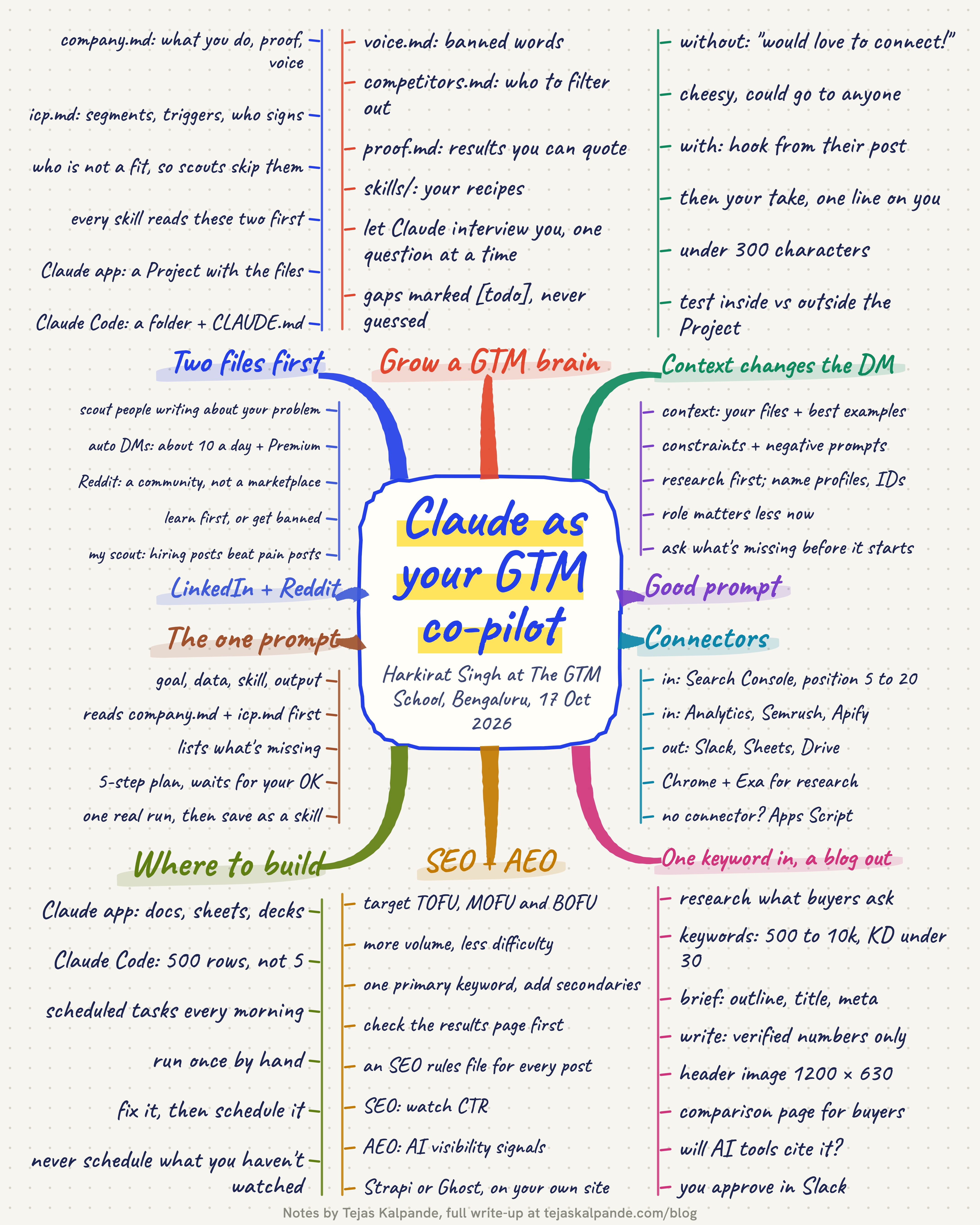
Here is the full workshop as one mind map, one branch per idea, from the two context files to LinkedIn and Reddit. Save it for later.
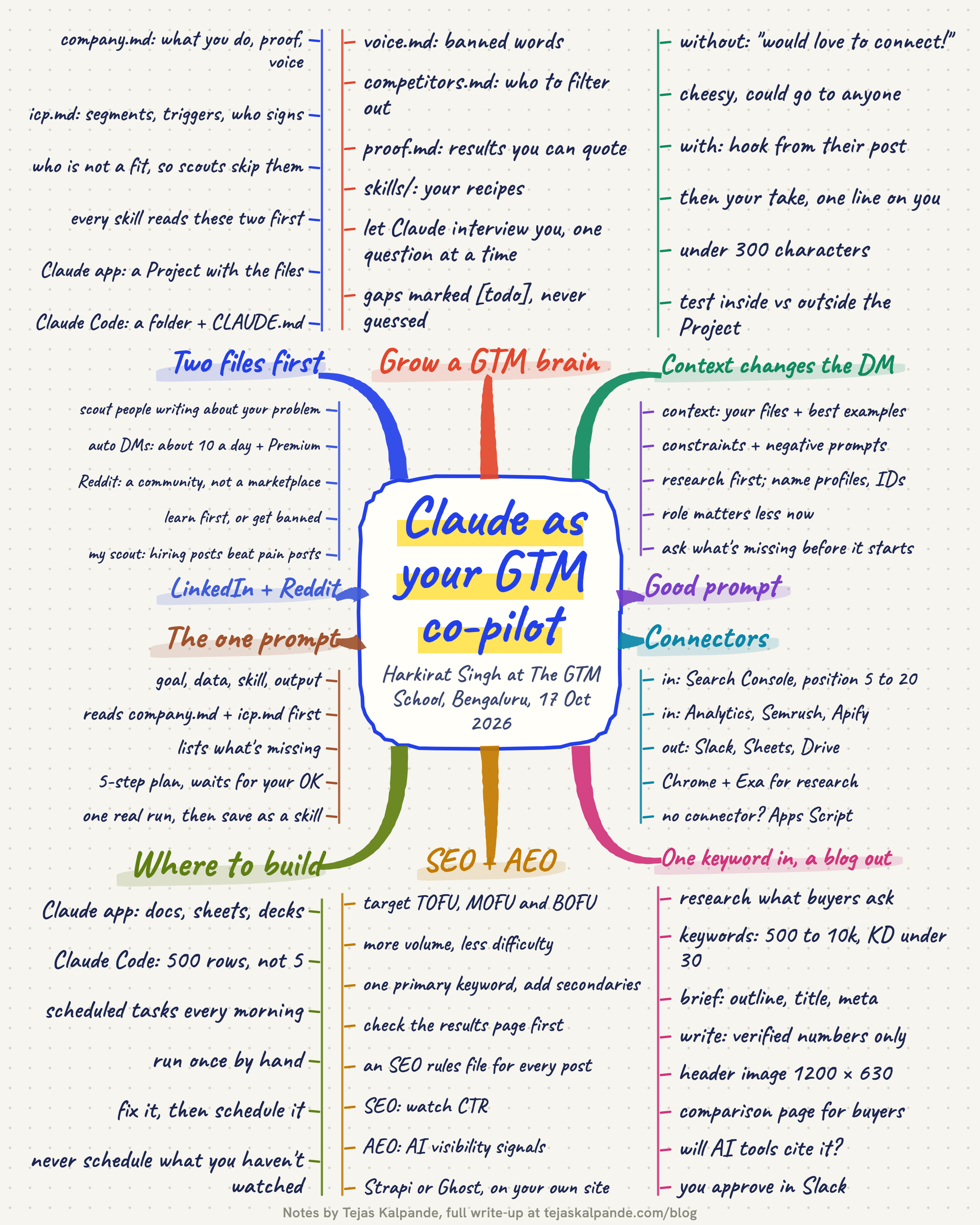
Open the full-size mind map to zoom in.
Key takeaways
- Write
company.mdandicp.mdfirst. Every prompt, skill and scout reads them. - A good prompt is context, constraints and clear instructions. Research first, and be specific.
- Turn the tasks you repeat into skills, and chain them, with a human approval at the end.
- Connect Claude to your real data and send the results where your team already works.
- Run every automation once by hand and fix it before you schedule it.
- On LinkedIn go slow. On Reddit, learn the community before you post.
Thanks
Thank you, Harkirat, for a workshop that gave us your whole playbook, and for the patience to help everyone in the room get theirs working. Thanks to AI Learn Circle and Women in Product Marketing, and to Garima Aneja and Prernaa Agarwal, for running The GTM School and keeping it free, and to Paytm for hosting us at their office.
Related: From Product Designer to Solopreneur, with Sankalp Sinha of NextDoor.Company, the previous GTM School session.